PRODUCT DESIGN CASE STUDY - Conceptual
Atlas - A room-first smart-home experience
Atlas - A room-first smart-home experience

ROLE
Product Designer
ROLE
Product Designer
SCOPE
UX/UI Design
SCOPE
UX/UI Design
PLATFORM
Mobile
PLATFORM
Mobile
TYPE
conceptual
TYPE
conceptual
TOOLS
Figma, HTML, CSS and JavaScript
TOOLS
Figma, HTML, CSS and JavaScript
01 — The problem
Smart homes promise simplicity. The experience often delivers the opposite.
This project started with something much smaller. My room had three remotes—one for the fan, one for the air conditioner and one for the curtains. That was just one room. Every bedroom had its own set, and the living room had another. Controlling the house meant juggling remotes instead of simply interacting with my home.

My first instinct was to put every device in one place.
HOME → ALL DEVICES → LIGHTS / LOCKS / PLUGS / SPEAKERS
This removed application switching, but it did not remove the user’s cognitive work. A person still had to scan a device inventory, remember names and translate a physical intention into a hardware category.
“One app” did not automatically mean “one understandable home.”
02 — The insight
People think in rooms,
not devices.
No one walks into a bedroom thinking about “Bulb 03.” They think about the bedroom.
BEFORE
Devices → Categories → Rooms → Controls
AFTER
Home → Rooms → Devices → Controls
People do not manage devices. They manage living spaces.
01 — The problem
Smart homes promise simplicity. The experience often delivers the opposite.
This project started with something much smaller. My room had three remotes—one for the fan, one for the air conditioner and one for the curtains. That was just one room. Every bedroom had its own set, and the living room had another. Controlling the house meant juggling remotes instead of simply interacting with my home.
My first instinct was to put every device in one place.
HOME → ALL DEVICES → LIGHTS / LOCKS / PLUGS / SPEAKERS
This removed application switching, but it did not remove the user’s cognitive work. A person still had to scan a device inventory, remember names and translate a physical intention into a hardware category.
“One app” did not automatically mean “one understandable home.”
02 — The insight
People think in rooms,
not devices.
No one walks into a bedroom thinking about “Bulb 03.” They think about the bedroom.
BEFORE
Devices → Categories → Rooms → Controls
AFTER
Home → Rooms → Devices → Controls
People do not manage devices. They manage living spaces.
03 — The solution
01 — Room-first control
The application opens into a room, not an inventory.
The application opens into a room, not an inventory.
Atlas starts with the room the person wants to control. Devices, status and actions change with that spatial context, while a visible room selector keeps switching available.
Principle: The system follows how people understand their home: by places, not hardware categories.


02 — Right amount of control
Simple actions stay immediate. More controls appear only when needed.
Simple actions stay immediate. More controls appear only when needed.
Lights and plugs can be controlled directly from their room cards. A thermostat opens a detail screen because temperature and power require additional control.
Principle: Turning on a light should not require the same interface as adjusting a thermostat.
03 — GUIDED DEVICE SETUP
Adding a device becomes a guided journey through the home.
Adding a device becomes a guided journey through the home.
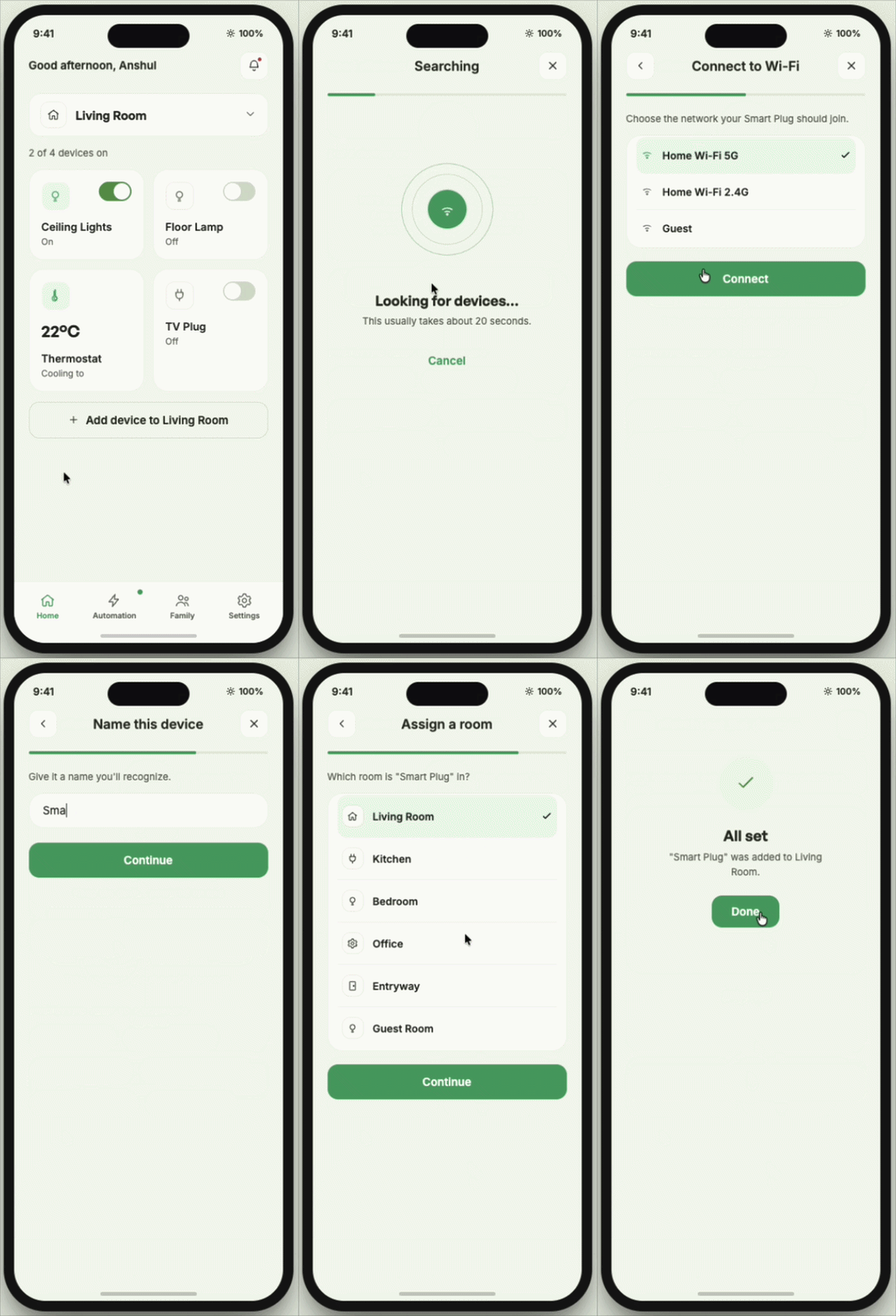
Atlas breaks setup into clear steps: find the device, connect it, name it, assign it to a room and test that it works.
Principle: The product handles the technical complexity while the person makes understandable choices.
04 — Readable automations
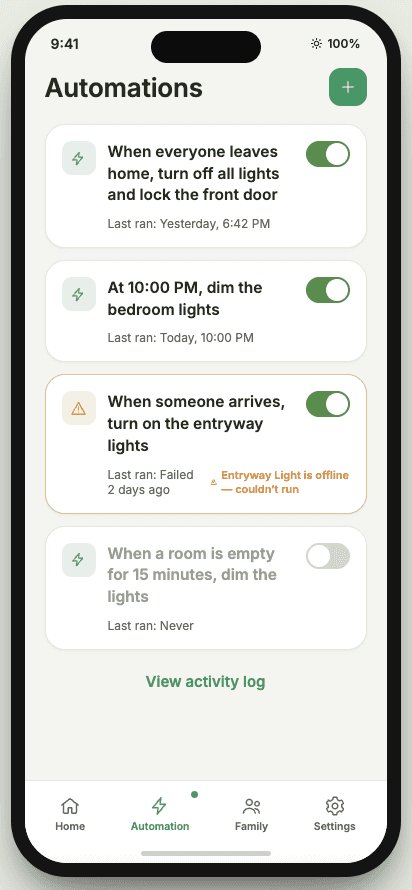
Every automation ends as a sentence the household can understand.
Every automation ends as a sentence the household can understand.
People choose when the automation runs, what happens and where it applies. Before saving, Atlas combines those choices into one plain-language rule.
Principle: People review the intended behaviour instead of remembering how automation logic works.
05 — Shared household access
Everyday control is shared without giving everyone administrative access.
Everyday control is shared without giving everyone administrative access.
Household members can control rooms and manage everyday automations. Sensitive actions, such as changing home settings or managing members, remain owner-controlled.
Principle: Shared access should reduce dependence without removing important safeguards.

03 — The solution
01 — Room-first control
The application opens into a room, not an inventory.
Atlas starts with the room the person wants to control. Devices, status and actions change with that spatial context, while a visible room selector keeps switching available.
Principle: The system follows how people understand their home: by places, not hardware categories.
02 — Right amount of control
Simple actions stay immediate. More controls appear only when needed.
Lights and plugs can be controlled directly from their room cards. A thermostat opens a detail screen because temperature and power require additional control.
Principle: Turning on a light should not require the same interface as adjusting a thermostat.
03 — GUIDED DEVICE SETUP
Adding a device becomes a guided journey through the home.
Atlas breaks setup into clear steps: find the device, connect it, name it, assign it to a room and test that it works.
Principle: The product handles the technical complexity while the person makes understandable choices.
04 — Readable automations
Every automation ends as a sentence the household can understand.
People choose when the automation runs, what happens and where it applies. Before saving, Atlas combines those choices into one plain-language rule.
Principle: People review the intended behaviour instead of remembering how automation logic works.
05 — Shared household access
Everyday control is shared without giving everyone administrative access.
Household members can control rooms and manage everyday automations. Sensitive actions, such as changing home settings or managing members, remain owner-controlled.
Principle: Shared access should reduce dependence without removing important safeguards.
04 — Key trade-offs
Making the system simpler meant deciding where control should remain visible.
AUTOMATIC ROOM DETECTION ↔ MANUAL CONTROL
Challenge
Automatic room detection removes a step but can place the entire home in the wrong context.
DECISION
Atlas suggests the current room, but manual room selection is never hidden.
WHY?
A correct prediction saves one step. An incorrect one changes the entire control context. The cost of being confidently wrong outweighs the benefit of full automation.
AUTOMATIC ROOM DETECTION ↔ MANUAL CONTROL
Challenge
Automatic room detection removes a step but can place the entire home in the wrong context.
DECISION
Atlas suggests the current room, but manual room selection is never hidden.
WHY?
A correct prediction saves one step. An incorrect one changes the entire control context. The cost of being confidently wrong outweighs the benefit of full automation.
SHARED AUTOMATION EDITING ↔ ADMINISTRATIVE SAFETY
Challenge
Owner-only editing creates dependency. Unrestricted editing makes household automations difficult to manage.
DECISION
Household members can edit everyday automations, while home-wide settings require confirmation.
WHY?
Everyone should be able to contribute without making changes that surprise the rest of the household.
SHARED AUTOMATION EDITING ↔ ADMINISTRATIVE SAFETY
Challenge
Owner-only editing creates dependency. Unrestricted editing makes household automations difficult to manage.
DECISION
Household members can edit everyday automations, while home-wide settings require confirmation.
WHY?
Everyone should be able to contribute without making changes that surprise the rest of the household.
EVERYDAY CONTROLS ↔ ADVANCED FLEXIBILITY
CHALLENGE
Showing every setting all the time increases scanning and decision effort during routine use.
DECISION
Frequent controls remain inside the room. Schedules, calibration and administrative settings sit one level deeper.
WHY?
Routine actions stay fast without removing access to advanced controls.
EVERYDAY CONTROLS ↔ ADVANCED FLEXIBILITY
CHALLENGE
Showing every setting all the time increases scanning and decision effort during routine use.
DECISION
Frequent controls remain inside the room. Schedules, calibration and administrative settings sit one level deeper.
WHY?
Routine actions stay fast without removing access to advanced controls.
Quiet notifications ↔ complete event visibility
CHALLENGE
Alerting on everything creates notification fatigue. Removing history makes unexpected behaviour difficult to investigate.
DECISION
Notifications are reserved for actionable or trust-critical events; full history stays in Activity.
WHY?
Alerts should prompt action. Activity should explain what happened.
Quiet notifications ↔ complete event visibility
CHALLENGE
Alerting on everything creates notification fatigue. Removing history makes unexpected behaviour difficult to investigate.
DECISION
Notifications are reserved for actionable or trust-critical events; full history stays in Activity.
WHY?
Alerts should prompt action. Activity should explain what happened.
04 — Key trade-offs
Making the system simpler meant deciding where control should remain visible.
AUTOMATIC ROOM DETECTION ↔ MANUAL CONTROL
Challenge
Automatic room detection removes a step but can place the entire home in the wrong context.
DECISION
Atlas suggests the current room, but manual room selection is never hidden.
WHY?
A correct prediction saves one step. An incorrect one changes the entire control context. The cost of being confidently wrong outweighs the benefit of full automation.
SHARED AUTOMATION EDITING ↔ ADMINISTRATIVE SAFETY
Challenge
Owner-only editing creates dependency. Unrestricted editing makes household automations difficult to manage.
DECISION
Household members can edit everyday automations, while home-wide settings require confirmation.
WHY?
Everyone should be able to contribute without making changes that surprise the rest of the household.
EVERYDAY CONTROLS ↔ ADVANCED FLEXIBILITY
CHALLENGE
Showing every setting all the time increases scanning and decision effort during routine use.
DECISION
Frequent controls remain inside the room. Schedules, calibration and administrative settings sit one level deeper.
WHY?
Routine actions stay fast without removing access to advanced controls.
Quiet notifications ↔ complete event visibility
CHALLENGE
Alerting on everything creates notification fatigue. Removing history makes unexpected behaviour difficult to investigate.
DECISION
Notifications are reserved for actionable or trust-critical events; full history stays in Activity.
WHY?
Alerts should prompt action. Activity should explain what happened.
05 — Reflection
The project changed when I realised the fix wasn't a universal remote — it was reorganising the home around rooms instead of devices.
I began by consolidating controls, but that still asked people to understand the home through devices. Restructuring Atlas around rooms changed navigation, setup, automation, permissions, notifications and failure states. The project reinforced that information architecture can be the product innovation—not merely the structure used to present it.
Thank you for reading.
05 — Reflection
The project changed when I realised the fix wasn't a universal remote — it was reorganising the home around rooms instead of devices.
I began by consolidating controls, but that still asked people to understand the home through devices. Restructuring Atlas around rooms changed navigation, setup, automation, permissions, notifications and failure states. The project reinforced that information architecture can be the product innovation—not merely the structure used to present it.